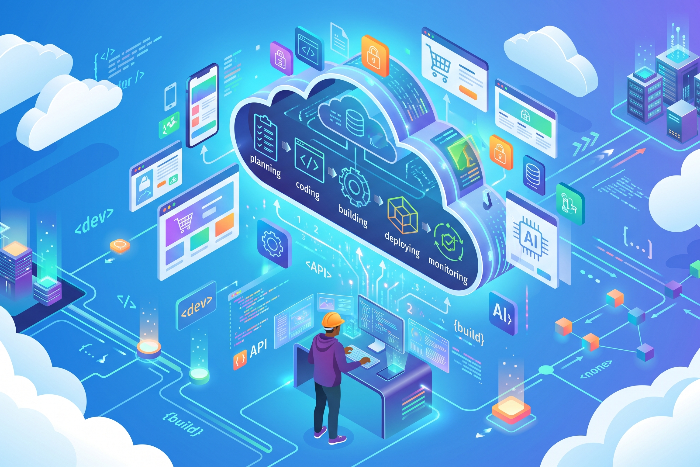
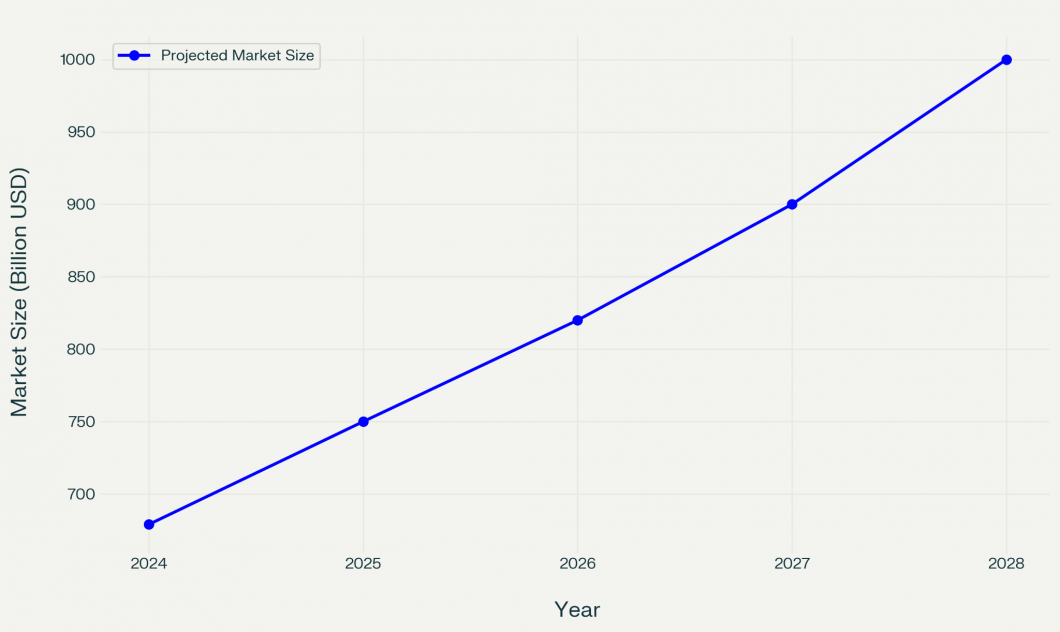
Cloud computing has become the backbone of modern software. In fact, Gartner predicts global public cloud spending will hit $679 billion in 2024, and more than half of enterprises will rely on industry-specific cloud platforms by 2028. For developers and product leaders, understanding cloud application development is essential. In this guide, we explain what cloud-based applications are, how they are built, and why they matter, using industry data and real-world examples.
What are Cloud-Based Applications?
Cloud-based applications are software programs that run on remote servers rather than on a device or a company’s in-house infrastructure. While users access these apps through web browsers or mobile clients, all the heavy lifting–data storage, processing, and updates–happens in secure cloud data centers. This setup allows you to use powerful tools without managing servers or installing bulky software locally.
Cloud apps behave like traditional desktop software but with the flexibility of the web. As long as the internet connection is decent, they offer fast, responsive performance without taking up your device’s storage. The best part? Everything stays synced across devices automatically.
Popular categories and examples include:
- Email & Communication: Gmail, Outlook Web
- File Sharing & Storage: Google Drive, Dropbox
- CRM & Business Tools: Salesforce, HubSpot
- Streaming & Media: Netflix, Spotify
- Analytics & Security: Civis Analytics, Forcepoint
In short, if an app’s core logic or data lives in the cloud and is delivered via the internet, it’s a cloud-based application.
What is Cloud Application Development?
Cloud application development is the process of building software that runs on cloud platforms like AWS, Azure, or Google Cloud instead of local servers. Developers write and deploy code directly to the cloud, using tools and services provided by the platform. The process typically involves modern practices like microservices, containers, DevOps, and CI/CD pipelines.
The application’s data and logic are hosted online, allowing teams to design functionality, user flows, and data models with flexibility. Based on needs, they might choose between serverless functions, containers, or virtual machines. Once the infrastructure is set up, configured for security and scalability, developers build the front-end and back-end, tying them together with APIs.
Key steps in the process include:
- Setting up cloud infrastructure (compute, storage, networking)
- Writing and integrating front-end and back-end code
- Running unit tests and performance/load testing
- Enabling auto-scaling, monitoring, and CI/CD deployment
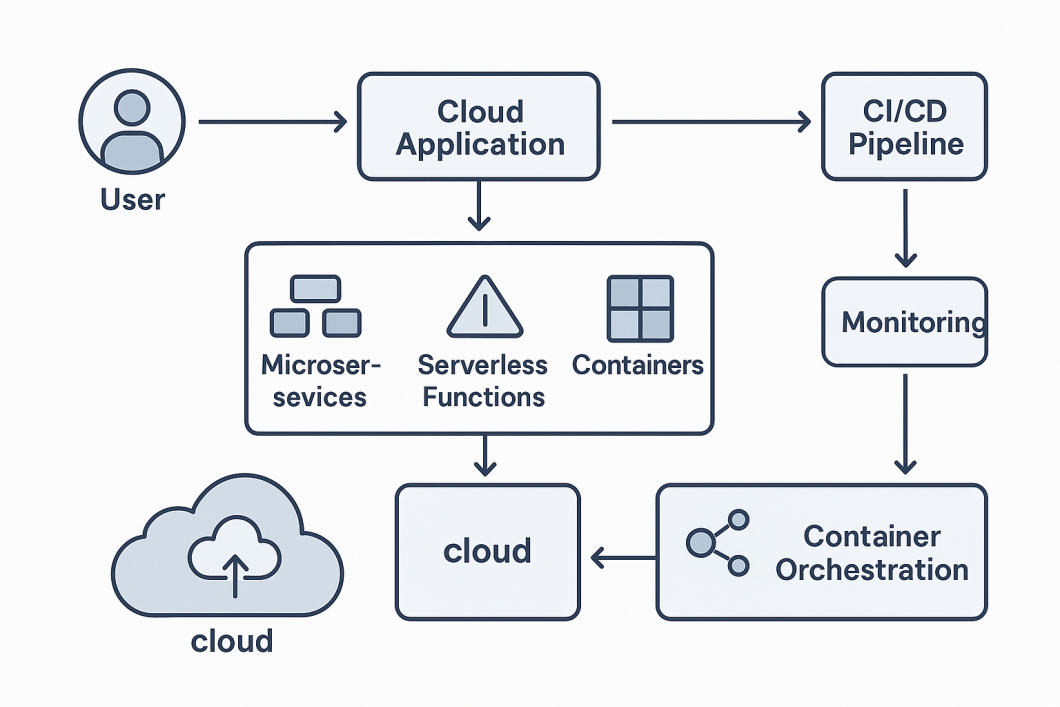
After deployment, teams continuously monitor, iterate, and roll out updates. In essence, cloud development follows the usual build-test-deploy cycle—but with automation, speed, and scalability built in.
What are the advantages of Cloud Application Development?
Building cloud applications offers technical and business advantages—managed infrastructure enables faster development, automatic updates, and rapid time-to-market. Cloud platforms also support instant scalability, ideal for traffic surges like eCommerce spikes on Black Friday, without manual intervention.
Cost is another key driver. Cloud platforms operate on shared infrastructure, which brings down operating costs. Public cloud migration can reduce total cost of ownership by up to 40%. Centralized data storage also improves availability and security, offering secure access from anywhere paired with high-end protections like encryption, multi-factor authentication, and built-in disaster recovery.
Other major advantages include:
- Built-in collaboration tools: Cloud apps often support real-time teamwork (e.g., co-editing documents).
- Zero manual updates: Providers handle patches and feature rollouts automatically.
- Global access: Teams can work remotely with no drop in performance or accessibility.
- Multi-cloud adoption: Around 80% of organizations now use more than one provider for flexibility and risk mitigation.
In short, cloud development fuels speed, scalability, and innovation. It’s no surprise that 97% of enterprises now rank cloud application development as a top priority. The momentum is massive—the global cloud market has grown 600% over the past decade and is projected to reach $1 trillion by 2028.
Of course, no technology is perfect. Cloud apps do pose new challenges (such as ensuring security, managing costs, and avoiding vendor lock-in).
The challenges of cloud computing are well-documented and worth understanding in depth. For now, it’s clear that the advantages, including agility, scale, cost savings, and more, make cloud application development extremely compelling.
What are the different types of Cloud Applications?
Cloud applications can be categorized in several ways – by service model and by how they are architected.
- SaaS (Software-as-a-Service): The most common type of cloud app, where software is delivered over the Internet and managed by a provider. Users access it via a browser or specialized client, often via subscription. Examples include Salesforce’s cloud CRM, Google Workspace (Docs, Sheets, Drive), and Microsoft 365 (Office in the cloud). Because SaaS removes the need for on-premises servers or software installations, it dramatically lowers upfront costs and IT overhead.
- PaaS (Platform-as-a-Service): This model provides a complete development and deployment environment in the cloud. Developers can build, test, and launch applications without managing the underlying servers or storage. Platforms like Google App Engine, Azure App Service, and Heroku are classic examples, offering built-in frameworks and tools to speed development.
- IaaS (Infrastructure-as-a-Service): The cloud provider offers basic computing resources – virtual machines, networking, storage – on demand. Services like Amazon EC2, Azure Virtual Machines, and Google Compute Engine let teams rent raw infrastructure. The provider handles hardware and virtualization (reboots, outages, etc.) while the user controls OS, middleware, and applications.
- Serverless (Function-as-a-Service): While not always listed separately, this model (e.g. AWS Lambda, Azure Functions) runs code in ephemeral containers, charging only for execution time. It abstracts servers entirely, so developers just upload code functions and define triggers.
Apart from service models, we can also classify cloud apps by their architecture:
- Cloud-native applications are built from the ground up to exploit cloud architectures. They typically use microservices (loosely coupled components) and are often deployed in containers or as serverless functions. Each component scales independently, and the app fully leverages cloud features like auto-scaling. In other words, a cloud-native app “takes full advantage of a cloud hosting architecture,” designed to maximize elasticity and resilience.
- Cloud-based applications is a more generic term for any app that runs in the cloud. This can include a traditional monolithic application that’s simply hosted on a cloud VM rather than an in-house server. For example, lifting a legacy app to run on an Amazon EC2 instance makes it cloud-based, though it may not be redesigned for cloud features. Essentially, cloud-based means “runs in the cloud,” whether it was originally built for the cloud or not.
- Cloud-enabled applications are those originally created for on-premises environments but then moved to the cloud (often by “lift-and-shift”). In this case, developers might make minimal adjustments so the app works with cloud services like identity management or networking. Think of it as a legacy app packed up and deployed on cloud infrastructure. These apps may not scale as elegantly as cloud-native ones – to handle more load, you’d provision more VMs rather than scale individual components automatically.
Each approach has its use cases. Cloud-native apps provide maximum scalability and flexibility, while cloud-enabled apps are faster to migrate but less elastic. SaaS, PaaS and IaaS choices depend on how much infrastructure control versus convenience an organization wants. In practice, many enterprises use a mix of all these types.
How to Develop Cloud-Based Applications?
Building a cloud application usually follows a clear, step-by-step process. A typical workflow (based on industry best practices) looks like this:
- Design the application. Define the app’s purpose, key features and target users. Decide on the overall architecture: will it be a traditional monolith, microservices or serverless? Sketch out data models and choose appropriate cloud architectures (e.g. single-instance, containerized, or serverless functions).
- Set up cloud infrastructure. Choose a cloud provider (AWS, Azure, GCP, or others) and provision the needed resources. Configure virtual machines, containers or serverless environments, along with storage and databases. At this stage, plan for scalability and security – use load balancers, auto-scaling groups and configure firewalls, IAM roles and encryption to protect the app from day one.
- Develop the application. Write the actual code: build the front-end UI and back-end services, connect them via APIs. Your team (or outsourced developers) should ensure the code implements the features from the design. Use the cloud provider’s SDKs and managed services where possible (for example, managed databases, messaging queues or AI APIs) to accelerate development.
- Test thoroughly. Execute unit tests on each component, then perform integration tests to check end-to-end functionality. Do load and performance testing to see how the app behaves under heavy user activity. Fix any bugs or bottlenecks early. Because cloud environments can scale, it’s often easier to simulate large traffic by spinning up more test instances.
- Deploy the application. Push your app to the cloud environment. Set up deployment configurations on the cloud platform so your app runs in production. Enable auto-scaling and health checks to ensure the app can handle traffic spikes. For example, configure Kubernetes clusters or AWS Elastic Beanstalk with rules to add instances when CPU usage is high. Also, establish monitoring (using cloud-native tools or third-party services) to track metrics like response time and error rates.
- Monitor and maintain. Once live, continuously monitor the application’s performance and health. Use the cloud platform’s built-in monitoring dashboards or third-party solutions to watch key metrics (latency, throughput, resource usage). Perform regular maintenance: apply software updates, patch security vulnerabilities, and address any issues the monitoring uncovers.
- Implement CI/CD. Automate future builds and deployments by setting up Continuous Integration and Continuous Deployment pipelines. For instance, use tools like Jenkins, GitLab CI/CD, or AWS CodePipeline to automatically build, test, and release new code whenever you push changes. This practice reduces manual errors and accelerates updates.
- Optimize and scale. After deployment, analyze usage data and user feedback to improve the app. Optimize code and database queries for faster responses. Adjust resource allocation based on actual demand—e.g. scale down unused servers or choose different instance types to cut costs. Implement load balancing so traffic is distributed across instances.
- Ensure security and compliance. Throughout development, keep security at the forefront. Conduct regular security audits and penetration testing. Use encryption (SSL/TLS) for data in transit and at rest, secure all APIs with authentication (OAuth, API keys, JWT), and enforce strict Identity and Access Management (IAM) rules so each service and user has only the permissions they need. Finally, ensure your application meets any industry regulations (e.g. HIPAA for health data or GDPR for privacy).
By following these steps (often in agile sprints) and leveraging cloud platforms’ features, teams can confidently build robust, scalable cloud applications. The process doesn’t end at launch – continuous monitoring, optimization, and security updates are key to long-term success in the cloud.
Examples of Cloud Applications
Cloud applications power many of the tools and services people use daily. Consider some real-world examples:
- Cloud storage and productivity: Google Drive, Microsoft OneDrive and Dropbox let users store and share files in the cloud. You can edit documents collaboratively in Google Docs or Office 365 (with changes saving instantly to the cloud). These are classic cloud apps: they free users from local storage and sync data across devices seamlessly.
- Webmail and communication: Gmail and Outlook.com are cloud-based email services accessed through the browser. Messaging and collaboration tools like Slack or Microsoft Teams are also cloud-hosted, enabling real-time chat, video calls and file sharing among distributed teams.
- Customer relationship management: Salesforce’s CRM is a cloud SaaS that many businesses use to track sales leads and customer interactions. Because it’s cloud-based, companies can scale up easily and access customer data from anywhere.
- Media streaming: Netflix and Spotify are prominent examples. Both store vast content libraries in the cloud and use cloud infrastructure to stream video/music on demand. Netflix, for instance, migrated all of its databases to AWS in 2016; this move let them onboard more users, handle usage spikes smoothly (like when a new show drops), and even increase content production.
- Video conferencing: Zoom is a cloud application hosted on the cloud. It provides video meetings and webinars without requiring users to manage servers. All processing and bandwidth scale automatically with demand.
- Development and analytics platforms: GitHub and GitLab offer cloud-hosted code repositories and collaboration. Cloud-based data platforms (like Snowflake or Google BigQuery) allow companies to run big data analytics without owning hardware.
These examples show how cloud apps span categories – from consumer services (streaming, cloud storage) to enterprise software (CRM, analytics). They run everywhere: on the device, the browser, or at Internet-scale, thanks to cloud infrastructure. In short, if you’re using a service online today, there’s a good chance it’s powered by the cloud.
How Are Cloud Applications Transforming Industries?
Cloud applications aren’t just tech for tech’s sake – they’re reshaping industries by enabling new business models, improving efficiency, and unlocking data insights. Here’s how cloud apps are making an impact in key sectors:
Healthcare
Healthcare has been rapidly moving to the cloud. A 2022 HIMSS survey found 94% of U.S. healthcare organizations have adopted cloud computing. The cloud’s flexibility addresses many healthcare needs:
- Electronic Health Records (EHRs) are often hosted in the cloud now, allowing doctors and patients to access records securely from anywhere.
- Telemedicine platforms rely on cloud apps to connect doctors with patients via video, even in remote areas.
- Medical imaging and analytics (such as AI-assisted diagnostics) are power-hungry tasks that cloud computing handles well, providing on-demand compute for processing MRI or CT scans.
Cloud computing in healthcare boosts collaboration and enables specialists to review cases across locations. Providers ensure strong security and HIPAA compliance through encrypted storage. On-demand access and secure sharing make healthcare more agile, connected, and patient-centric.
Mindfire developed a robust Healthcare Management System (HMS) for a U.S.-based multi-specialty provider. Designed to support clinics, hospitals, and outpatient services, the platform streamlines patient data, appointments, medications, and care workflows. Built using .NET Core, Flutter, and AWS Cloud services like EC2 and S3, it ensures secure, scalable performance while maintaining healthcare compliance. The system leverages ReactJS dashboards and cloud-based authorization to modernize operations and enhance patient care.
Finance
Banks and financial services were initially cautious about the cloud due to regulations and security. However, the industry is now accelerating cloud adoption to stay competitive. For example, traditional banks use cloud platforms for loan origination and underwriting, and to modernize payment and card processing systems. A recent cloud survey found that although banks started with limited cloud use, they now view cloud as essential for growth and innovation. One key driver is competition from fintech startups: cloud enables banks to rapidly develop mobile apps, integrate AI for fraud detection, and personalize customer experiences.
Moreover, data and AI projects are pushing finance firms to the cloud. By moving large data sets to cloud warehouses, banks can run analytics at scale – for risk modeling or customer insights – that were hard to do on-premises. Banks are increasing cloud spending to tap into AI and improve customer service. In short, cloud apps are helping finance companies innovate (faster product design, better customer experience) while also improving operational efficiency.
Internal Link: For a deeper dive into real-world trends, use cases, and strategic insights shaping financial cloud adoption, check out our in-depth guide on Cloud Computing in Banking.
Digital Publishing
In media and publishing, cloud adoption is high. A Forrester study (commissioned by Akamai) found 92% of media/entertainment companies report successful cloud adoption. Publishers use cloud-based content delivery networks (CDNs) to distribute news, video and images globally with minimal latency. The cloud also powers personalization engines that tailor articles or ads to individual readers. For example, major news outlets like The New York Times and streaming platforms like Netflix rely on the cloud to handle massive, unpredictable traffic. Netflix’s move to AWS (mentioned earlier) is a case in point.
By running on the cloud, publishers can publish updates instantly and scale effortlessly during spikes (e.g., breaking news or viral videos). Cloud analytics reveal reader/viewer trends in real time, allowing media companies to adjust content strategy dynamically. According to industry experts, cloud has become the “de facto platform” for modern content distribution. In other words, digital publishers are thriving on the cloud’s speed and reach.
To explore how cloud is transforming content distribution, personalization, and publishing operations, read our full article on Cloud Software in the Publishing Industry.
Manufacturing
Industry 4.0 is powered by the cloud. Manufacturers increasingly use cloud-based systems to connect machines, track supply chains, and perform predictive maintenance. For instance, Siemens deployed its MindSphere IoT platform on AWS in a factory to monitor production lines in real time. This cloud-based setup lets engineers see overall equipment efficiency immediately, uncover a faulty machine, and boost yield by 3%. They achieved this without buying new hardware – the cloud enabled quick provisioning of resources and global scalability.
More broadly, cloud supports digital twins (virtual replicas of factory equipment) and advanced analytics. Sensors on machinery stream data to the cloud for analysis, helping optimize operations. According to industry forecasts, cloud in manufacturing is growing fast: the market is projected to jump from $72.2 billion in 2024 to $211.7 billion by 2032 (CAGR ~14.4%). Cloud computing lets manufacturers implement smart factories with minimal upfront investment. It improves collaboration across global supply chains (partners can share data in the cloud) and provides on-demand compute for tasks like AI vision systems on assembly lines.
Manufacturers that leverage cloud apps enjoy greater agility and efficiency; essential for staying competitive in today’s fast-paced markets.
Education
Cloud applications are transforming education by enabling remote learning and personalized instruction. Learning Management Systems (LMS) like Canvas, Moodle, and Google Classroom run in the cloud, hosting course materials and quizzes for millions of students. Video conferencing tools (Zoom, Microsoft Teams) allow virtual classrooms and parent-teacher meetings. The cloud also powers educational content platforms: for example, Khan Academy or Coursera deliver interactive lessons online using cloud servers.
From a data perspective, cloud analytics help educators track student progress and identify learning gaps in real time. Schools can access library resources, textbooks and research databases from anywhere with the cloud. Importantly, cloud services reduce IT costs for educational institutions – they no longer need costly on-campus servers. The education cloud market is booming; one analysis predicts the global cloud computing in education market will reach over $316 billion by 2034. In short, cloud apps have made learning more flexible, accessible and adaptive to each student’s needs.
Retail & eCommerce
Retailers and eCommerce companies rely on cloud applications for nearly every aspect of their business. Online shopping platforms (Shopify, Magento Commerce) run on cloud infrastructure to serve customers around the clock. Cloud databases and analytics engines help them analyze user behavior and personalize recommendations. For brick-and-mortar stores, cloud-based point-of-sale (POS) and inventory systems connect all locations in real time, avoiding stock outs.
Cloud also enables rapid scaling for retailers during peak seasons. For example, when Cyber Monday traffic surges, a cloud-hosted storefront can spin up extra servers in minutes. Customer data sits in the cloud, allowing for global marketing campaigns and omnichannel experiences. Even supply chain and logistics are managed on cloud platforms for route optimization and demand forecasting.
Major retailers have publicly shared how cloud powers their operations: Walmart uses Google Cloud’s infrastructure for its online store and to train AI models, while Target utilizes AWS for data analytics. Although specific stats vary, industry reports show retail cloud adoption is accelerating as businesses aim for digital transformation. In essence, cloud apps allow retailers to deliver seamless shopping experiences, faster innovations (like virtual try-ons) and operate more efficiently.
Internal Link: To explore how cloud technologies are reshaping retail operations and driving smarter, scalable commerce, check out our deep-dive resources – Discover how leading platforms and brands are evolving through Cloud based Ecommerce strategies, and dive into broader innovations across inventory, logistics, and customer engagement with our insights on Cloud Computing in Retail.
Transportation
The transportation and logistics sector is increasingly cloud-driven. Ride-hailing apps (Uber, Lyft) are cloud applications at heart: they collect GPS data, match drivers with riders, and handle payments all via cloud services. Logistics companies use cloud platforms to track fleets and shipments in real time, improving delivery accuracy. For example, a shipping cloud service can integrate vehicle telematics, weather data, and traffic info to optimize delivery routes on the fly.
In aviation and rail, cloud applications manage reservations, scheduling, and predictive maintenance. Airlines use cloud analytics to anticipate delays and improve customer service; rail companies track freight cars with IoT sensors feeding the cloud. Even autonomous vehicles rely on cloud infrastructure to process large volumes of sensor data and share learnings.
While specific public statistics on cloud in transportation are less common, industry trend reports consistently list cloud computing and IoT as top technologies reshaping logistics. By enabling transparency and real-time decisions, cloud apps are helping transport companies reduce costs and increase reliability.
Mindfire built a cloud-native logistics app for a U.S.-based trucking company that previously relied on spreadsheets. Designed to streamline operations across carriers, shippers, and brokers, the app automates shipment tracking, task assignments, and payment flows. We used AWS services—EC2, S3, RDS, SNS, and SES—for real-time data sync and secure communication across user types. The platform was built with Django REST, ReactJS, and Stripe Connect for seamless web and mobile experiences on iOS and Android. This solution brought full automation to the client’s shipping process.
Role of a Software Development Company in Cloud Application Development
Top technology trends in 2026 suggest the global cloud application market continues its rapid ascent, with businesses of all sizes migrating core operations to the cloud. Cloud-based applications now account for the majority of enterprise software deployments, driven by the demand for scalability, remote accessibility, and reduced infrastructure costs.
Building a cloud application isn’t just about moving infrastructure—it’s about reimagining how your software is designed, built, and scaled. That’s where the right development partner comes in. A seasoned team helps define architecture (monolith, microservices, or serverless), set up CI/CD, implement security, and optimize performance. They guide decisions on cost-effective storage, data flow, and scalability. Whether you’re using AWS, GCP, or a hybrid setup, a good partner tailors the solution to your business needs and helps avoid vendor lock-in. Post-deployment, they ensure your app runs smoothly under real-world loads. In short, the right software partner turns your cloud ambition into secure, scalable impact, without the guesswork.
For businesses seeking the right partner, Mindfire stands out with its deep expertise, agile approach, and proven success in cloud-native solutions. From architecture design to post-deployment support, Mindfire ensures speed, scalability, and security at every step. Explore our Cloud Application Development Services to see how we turn your cloud vision into a robust, future-ready application. Contact us today to discuss your cloud strategy.